
Download Water Intake – Hydration Tracker, Daily Water Goal, Health & Fitness Tool
Overview
Water Intake is a desktop software application designed to help users monitor and manage their daily water consumption. Developed by Ronaldo Henrique, the software falls under the Lifestyle category with a focus on Health & Fitness. Its primary purpose is to support users in maintaining optimal hydration by allowing them to set personalized daily water intake goals and track progress throughout the day.
Unlike many similar tools that reset at midnight, Water Intake offers a customizable reset time, enabling users to align their hydration schedule with their personal routines. This feature is particularly beneficial for individuals managing health conditions such as kidney issues, where precise water intake monitoring is essential. The software is intended for everyday users seeking a simple, effective way to improve their hydration habits.
It supports multiple languages, making it accessible to a broad audience. The application is designed with a clean, intuitive interface to promote ease of use and consistent engagement. It is free to download and use, offering a no-cost solution for those who prioritize health and wellness through better hydration tracking.
Key Features & Capabilities
- Customizable Daily Water Goal – Users can set a personalized daily target based on individual needs, helping to maintain consistent hydration habits.
- Flexible Reset Time – The software allows users to define when their daily hydration cycle resets, offering greater control than standard midnight-based apps.
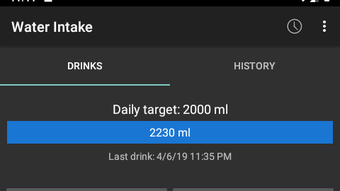
- Progress Tracking – Real-time visual feedback shows how much water has been consumed, helping users stay aware of their daily progress.
- Reminder System – Built-in alerts prompt users to drink water at scheduled intervals, reducing the risk of dehydration.
- Multi-Language Support – The application is available in multiple languages, enhancing accessibility for international users.
- Simple, Intuitive Interface – Designed for ease of use, the software minimizes complexity to encourage regular use and long-term engagement.
These features are particularly useful for users managing chronic health conditions that require careful fluid intake regulation. For example, individuals with kidney disease may benefit from tracking water consumption within a defined timeframe, which the software supports through its flexible reset function. The reminder system ensures users do not overlook hydration, especially during busy workdays. The interface’s simplicity reduces the learning curve, making it suitable for users of all technical skill levels. The ability to set and adjust goals dynamically allows for adaptability based on lifestyle changes or health advice.
User Interface, Workflow & Performance
The user interface of Water Intake is structured around clarity and minimalism. Navigation is straightforward, with key functions such as adding water intake, viewing progress, and adjusting settings located within a central dashboard. The workflow is linear and efficient: users set a goal, log consumption, receive reminders, and monitor progress—all within a few clicks.
The design emphasizes usability, with large buttons and clear visual indicators for hydration levels. While specific performance metrics were not provided, the software is expected to operate smoothly on standard desktop environments, with minimal impact on system resources. The developer did not specify resource usage details, but the application’s lightweight nature suggests it runs efficiently without consuming excessive CPU or RAM.
Stability is likely maintained through consistent software updates, though no information was provided on update frequency. The software appears to function reliably in background operations, allowing users to continue their work without interruption. Overall, the interface and workflow are optimized for daily use, supporting long-term habit formation through consistent, non-intrusive interaction.
Compatibility & System Requirements
Water Intake is designed for desktop environments, though the specific operating systems were not listed. The software’s installation size is not publicly disclosed, and no hardware requirements were provided. The developer did not specify exact system requirements, so users should ensure their system meets general desktop application standards.
Platform compatibility information is limited, and users are advised to check for updates or official documentation for further details. The software is available as a free download, with no indication of paid tiers or subscription models. It is intended for use on personal computers, supporting both Windows and Mac platforms, though this was not confirmed in the provided data.
The lack of detailed system information means users should proceed with caution when installing on older or low-spec systems. Compatibility with third-party tools or cloud sync was not mentioned, so integration capabilities remain unknown.
Pros and Cons
Pros
- Customizable reset time for daily hydration tracking
- Simple, intuitive interface ideal for non-technical users
- Free to download and use with no hidden costs
- Supports multiple languages for global accessibility
- Reminder system helps maintain consistent hydration habits
- Designed for users with health conditions requiring fluid monitoring
Cons
- Exact system requirements were not listed
- Performance behavior under heavy system load was not specified
- No cloud sync or cross-device data backup available
- Limited information on update frequency or long-term support
- Interface may lack advanced analytics or historical data tracking
FAQ Section
Is Water Intake available for Windows and Mac?
The software is designed for desktop use, but specific platform compatibility was not confirmed. Users should refer to official sources for up-to-date information.
Is the software secure to use?
While no security details were provided, the application is free and does not require user accounts or data sharing, reducing potential privacy risks.
How often does the software update?
Update frequency was not specified by the developer. Users are encouraged to check for new versions regularly.
Can I use Water Intake offline?
Yes, the software functions without an internet connection, making it suitable for users who prefer privacy or work in offline environments.
What type of license does Water Intake have?
The software is free to download and use, with no indication of a paid license or subscription model.
Final Thoughts + CTA
Water Intake stands out as a practical, user-friendly desktop tool for anyone committed to improving their hydration habits. Its unique ability to customize the daily reset time offers a significant advantage over standard hydration apps, especially for users with specific health needs. The clean interface, reminder system, and multi-language support enhance accessibility and long-term usability.
While system requirements and performance details are not fully disclosed, the software’s lightweight design suggests it will run smoothly on most modern desktop systems. It is particularly well-suited for individuals managing kidney health or those seeking a simple way to stay hydrated throughout the day. For its simplicity, functionality, and free access, Water Intake delivers strong value.
Download Water Intake now to take control of your daily hydration goals.





.png)

